Integrated POS & Inventory Management System
CARO Management Inventory is a portfolio template that create fully by Google Sheet and Appscript suitable for small business, warehouse and related businesses.
Services
Automations Data, Data Management, Data Entry Tools
Tools
Google Sheets, Apps Script
Value
Automations Data Entry, Diference DB Sheets
Timeline
5 weeks
Project Overview
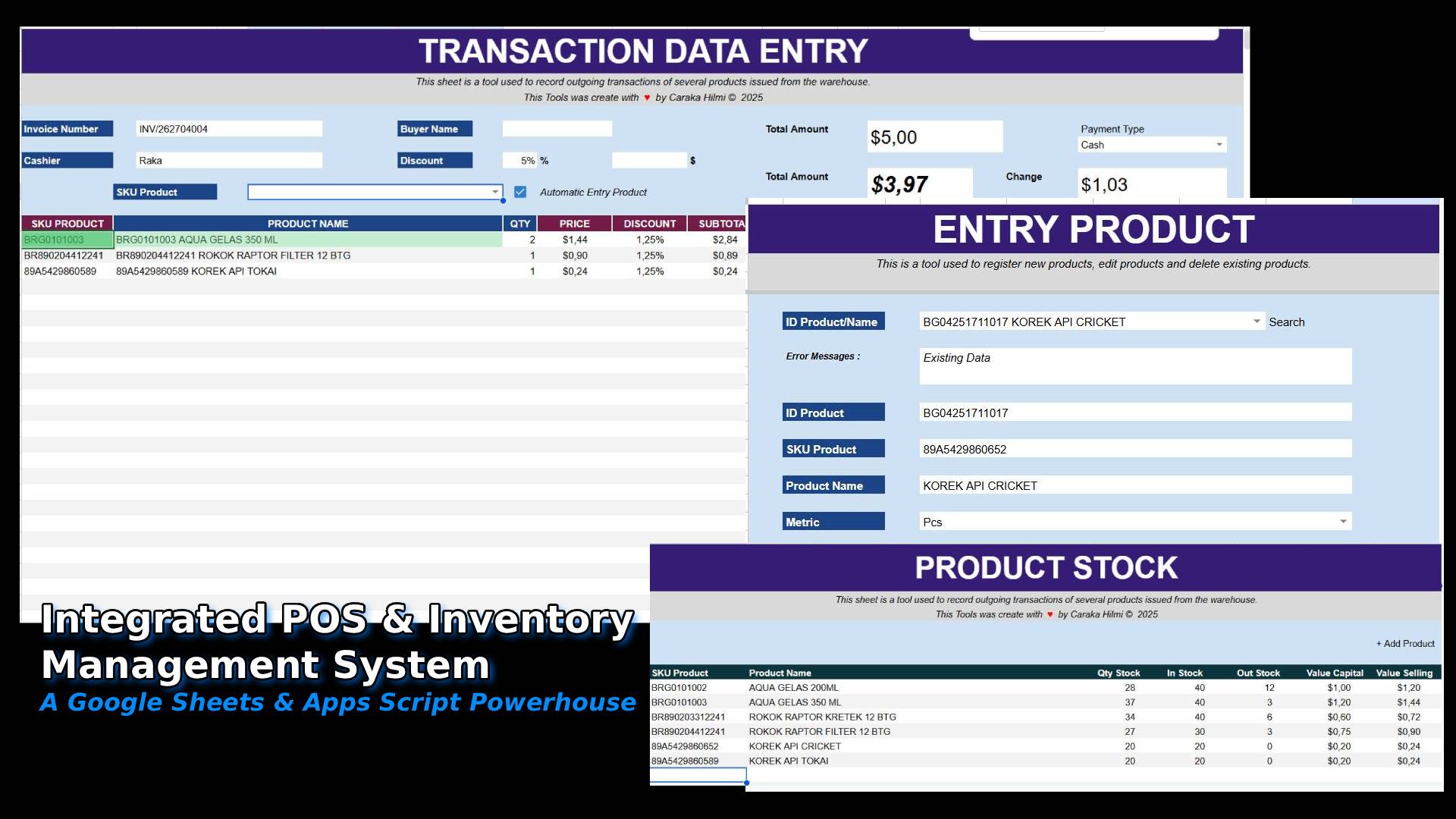
This project is a comprehensive Point of Sale (POS) and Inventory Management System built entirely within the Google Sheets ecosystem. By leveraging Google Apps Script and advanced array formulas, I transformed a standard spreadsheet into a dynamic, automated business tool. This system serves as a lightweight, cost-effective alternative to expensive ERP software, offering real-time stock tracking, automated transaction entries, and a user-friendly interface.
Key Features:
Dynamic Product Management: Seamlessly add, edit, or delete products with a custom-built UI.
Automated POS Interface: A "Smart Cart" system that fetches product details and calculates margins instantly.
Real-time Inventory Sync: Automatic stock level updates (In/Out/Current) upon every transaction.
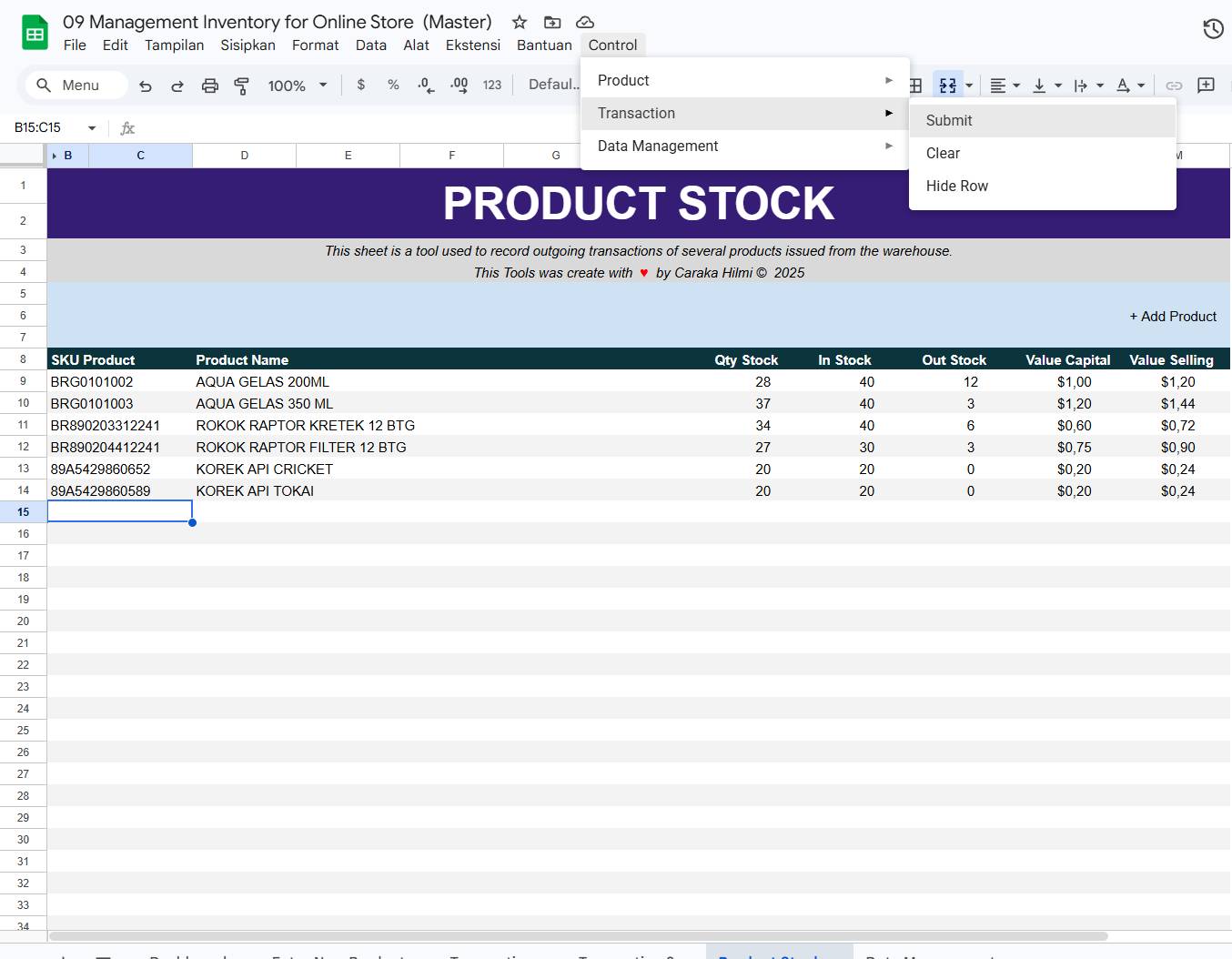
Custom Scripting: A bespoke "Control" menu integrated into the Google Sheets toolbar for professional-grade workflow management.
Detailed Module Breakdown
1. Central Control & Workflow Automation
The backbone of this system is the Custom Control Menu. Unlike standard spreadsheets, this tool features a dedicated "Control" tab in the Google Sheets toolbar.
Apps Script Integration: I developed custom scripts to handle backend processes like data submission, clearing forms, and UI management.
Streamlined Navigation: Users can trigger "Submit," "Clear," or "Hide Row" functions with a single click, ensuring a smooth operational flow that mimics a standalone desktop application.
2. Intelligent Product Entry & Management
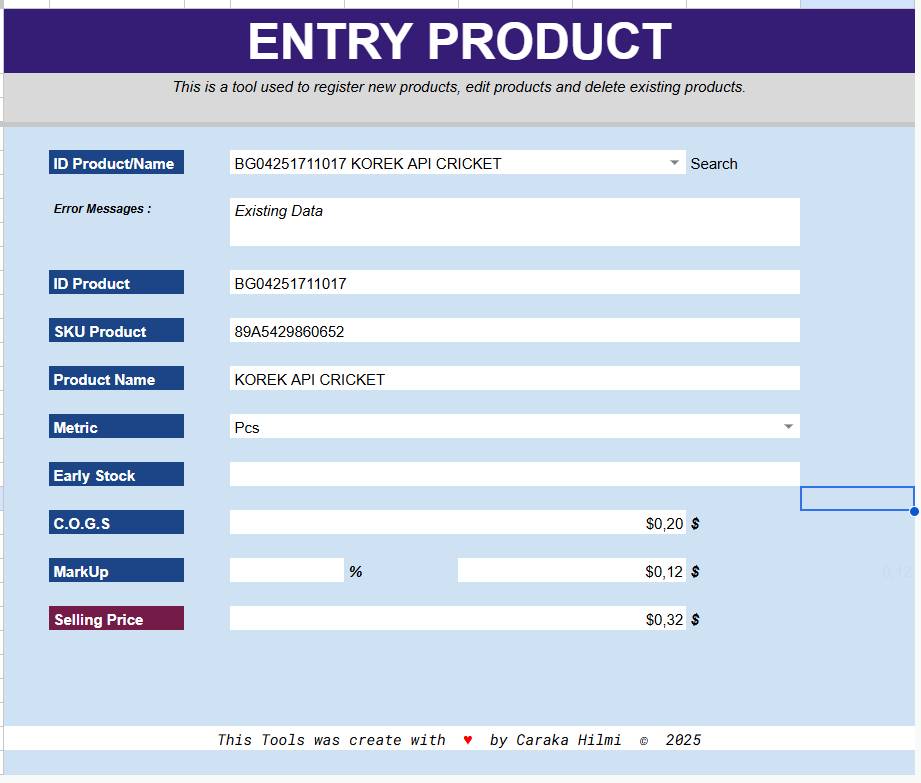
The Entry Product Module is designed for high-efficiency data handling. It functions as a CRUD (Create, Read, Update, Delete) interface.
Search & Edit: By entering a Product ID or Name, the system performs a VLOOKUP to retrieve existing data, allowing for instant updates or deletions.
Financial Accuracy: This sheet doesn't just store names; it calculates the Selling Price based on C.O.G.S (Cost of Goods Sold) and a defined Mark-Up percentage, ensuring consistent profit margins across the board.
Error Handling: Integrated "Error Messages" logic prevents duplicate entries and ensures data integrity.
3. Transaction Data Entry (The POS Interface)
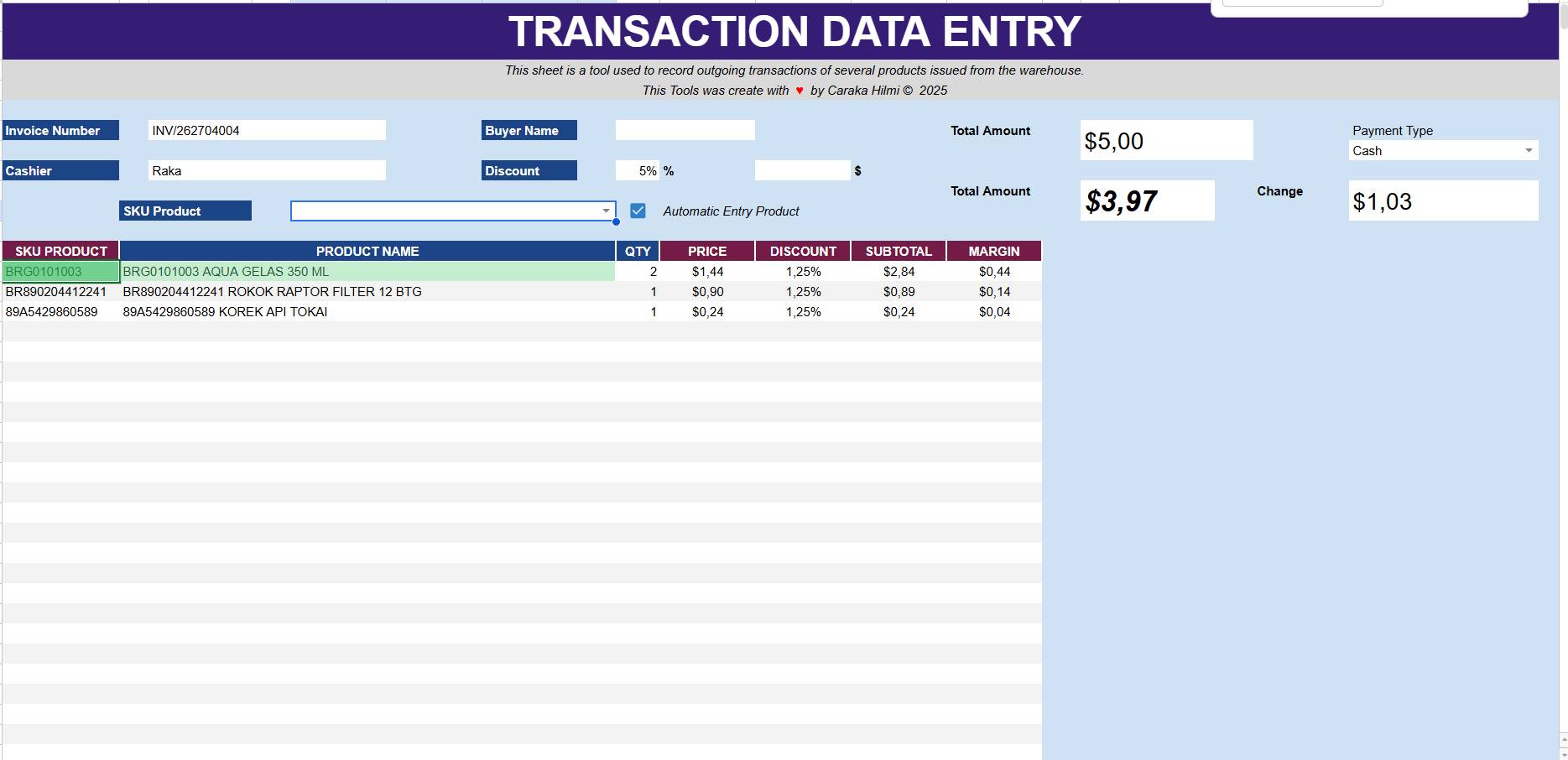
This is the heart of the retail operation. The Transaction Data Entry sheet mimics a professional POS terminal.
Automatic Entry Product: When the "Automatic Entry" checkbox is active, the system uses Apps Script and advanced formulas to instantly populate the "cart" table. It fetches the price, applies the SKU, and prepares the subtotal without manual typing.
Flexible Discounting: The UI supports both Percentage (%) and Nominal ($) discounts, providing flexibility for promotional campaigns.
Margin Tracking: Unique to this system is the real-time Margin Calculation per line item, allowing business owners to see exactly how much profit is being made on every single transaction before it's even submitted.
Automated Checkout: Upon submission, the system generates a transaction record and prepares data for receipt printing.
4. Real-Time Product Stock Dashboard
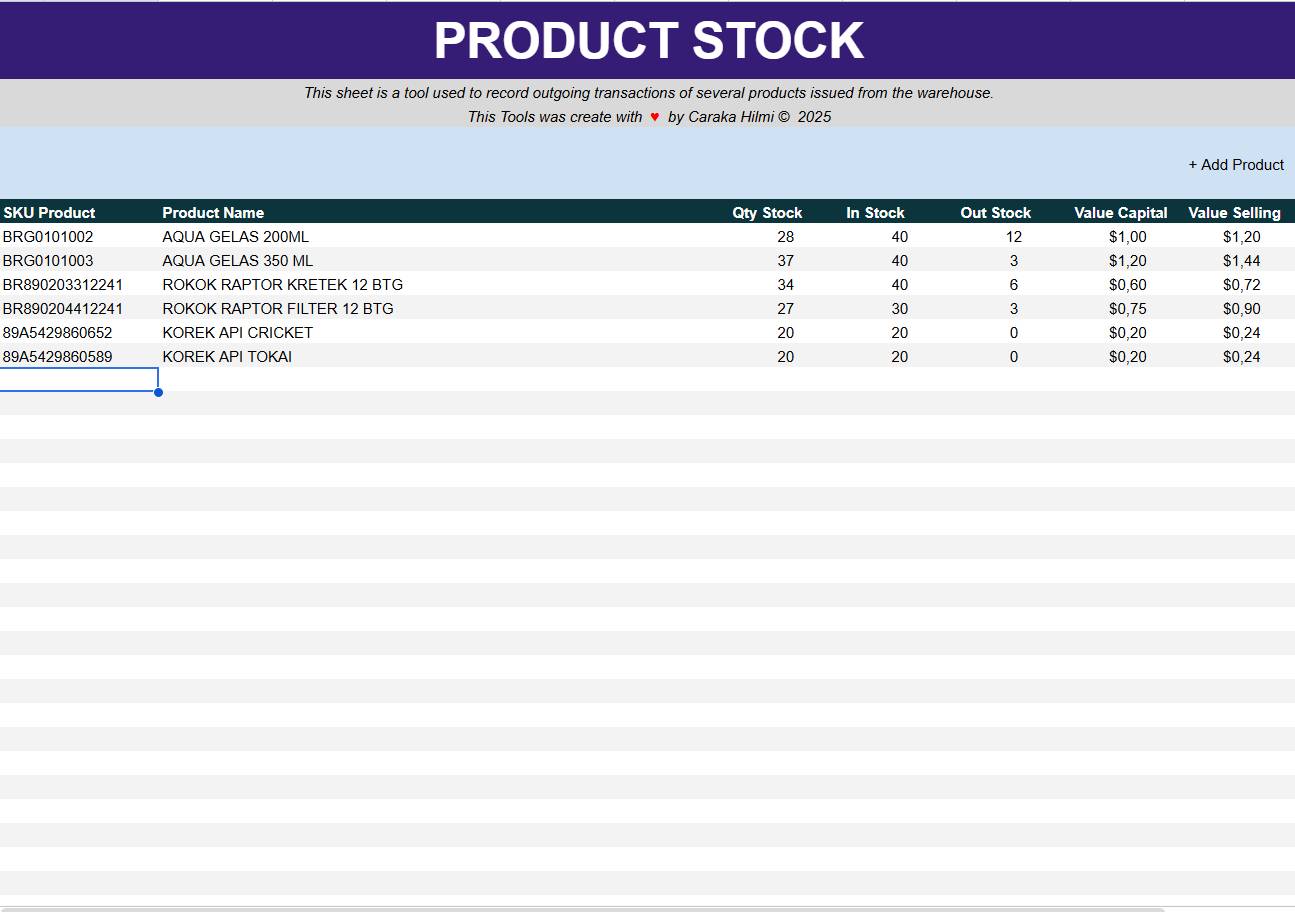
The Product Stock Module provides a high-level overview of the business's health.
Inventory Synchronization: This sheet acts as a live ledger. It tracks "In Stock" (from purchases) and "Out Stock" (from POS sales) to calculate the "Qty Stock" in real-time.
Valuation Insights: It displays both Value Capital and Value Selling, allowing for an instant audit of total inventory value and potential revenue.
Data Visualization: Uses clean, conditional formatting to highlight stock levels, ensuring the user knows exactly when it’s time to restock.
Technical Stack
Platform: Google Sheets
Language: Google Apps Script (JavaScript-based)
Logic: Complex Array Formulas, VLOOKUP, Data Validation, and Conditional Formatting.
Design: UI/UX optimized for data entry speed and accuracy.
Created with ♥ by Caraka Hilmi © 2025
Suggested SEO Keywords for your Website:
Google Sheets POS System, Inventory Management Automation, Google Apps Script Portfolio, Spreadsheet ERP, Automated Retail Tool, Custom Inventory Tracker, Caraka Hilmi Portfolio.
Projects